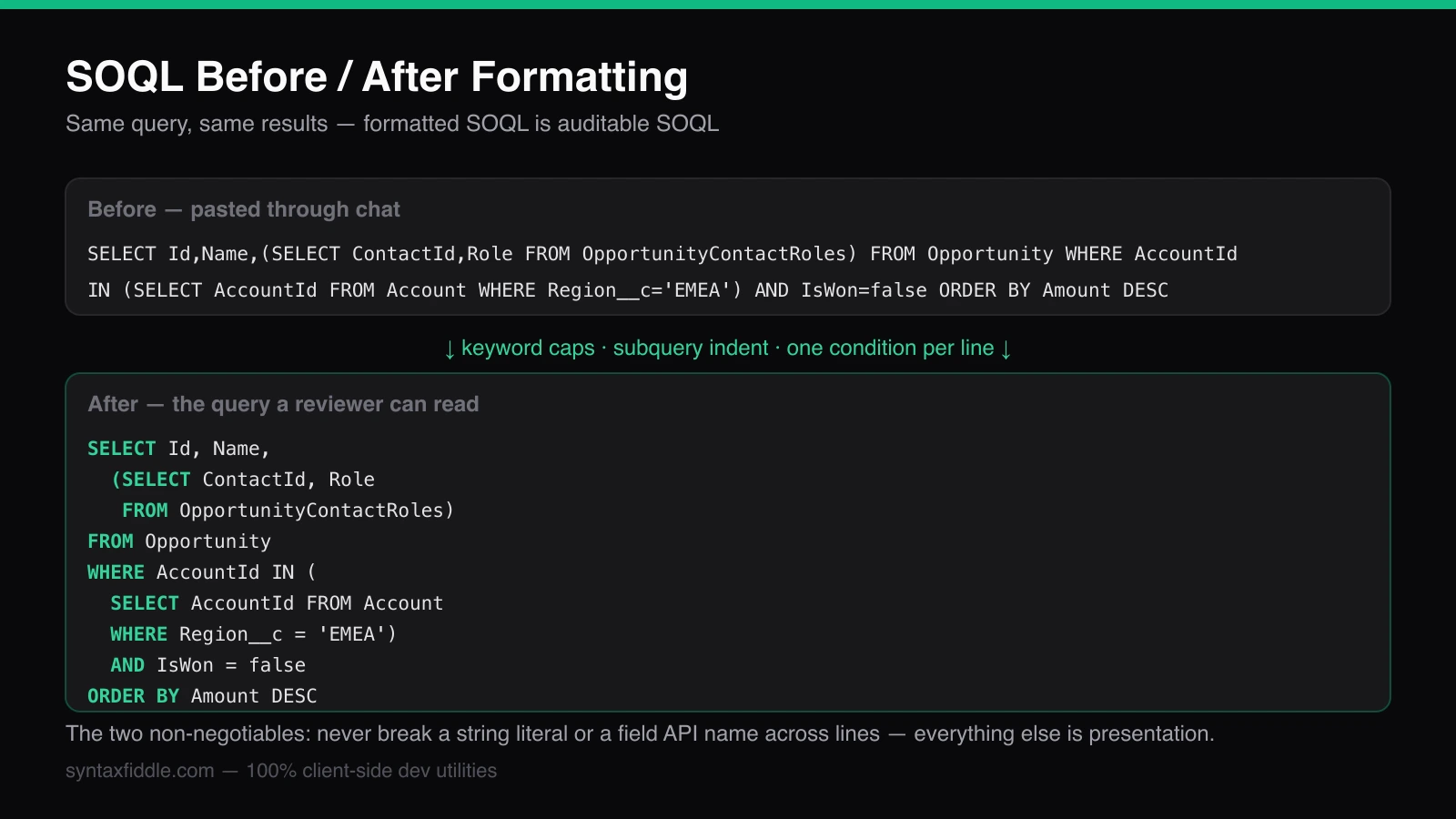
Every Salesforce team has that one query: three hundred characters on a single line, pasted through chat, holding a subquery nobody can find and a WHERE clause nobody can audit. SOQL is forgiving — it runs identically pretty-printed or minified — which is exactly why unformatted SOQL proliferates. The cost is not in execution but in every human act around the query: reviewing it, modifying it, diffing it, and teaching it. This guide gives the formatting conventions used in well-run orgs, the layouts for the constructs that actually get messy (subqueries, TYPEOF, aggregates), and the one-click path when you would rather not apply them by hand.
Why formatting SOQL matters more than you think
Formatted SOQL is auditable SOQL. A WHERE clause laid out one condition per line answers security-review questions by eye: which fields are read, what scope the filter applies, whether the limit is present. The same query minified answers nothing until someone mentally parses it — and the reviewer who has to parse it is the reviewer who stops reviewing. Long queries also get edited, and edits to unformatted queries are where silent mistakes live: a condition appended to the wrong side of an OR, a limit bumped past its intent.
Formatting is also how SOQL is taught. A junior admin can read an indented relationship query and see its shape — parent, child subquery, filter scope — where the one-line version reads as noise. Teams that keep their queries formatted in Apex classes, documentation, and debug-log investigations share a vocabulary; teams that do not re-decode every query from scratch.
The five rules of readable SOQL
Uppercase the keywords, leave the API names alone. SELECT, FROM, WHERE, ORDER BY, GROUP BY, LIMIT in caps; field and object API names exactly as the schema defines them (Amount, StageName, LastModifiedDate). Keyword case is the visual scaffolding — the reader's eye separates structure from data without reading a word.
One line per logical unit. Fields can share a line when short; the WHERE clause gets one comparison per line with the connecting AND or OR at the start of the continuation line. A query with eight conditions reads as eight checkable lines instead of one unparseable wall.
SELECT Id, Name, Account.Name, Amount, CloseDate
FROM Opportunity
WHERE CloseDate >= LAST_QUARTER
  AND StageName IN ('Negotiation', 'Proposal/Price Quote')
  AND Amount > 10000
ORDER BY Amount DESC
LIMIT 100
Indent subqueries like the nested queries they are. A parent-child subquery is a full SELECT living inside one; it gets its own indented block with its own field list and filter. Flattening it into the parent line is how subqueries end up lost in review.
SELECT Id, Name, Amount,
  (SELECT ContactId, Role, IsPrimary
   FROM OpportunityContactRoles
   WHERE IsPrimary = true)
FROM Opportunity
WHERE AccountId IN (
  SELECT AccountId
  FROM Account
  WHERE Region__c = 'EMEA'
)
Break relationship paths at the dot. Account.Owner.Name on a long line hides the traversal; in field lists with several relationship columns, one relationship field per line keeps the depth visible. Keep the API names unbroken — a relationship path split across lines is a parse error, not a style choice.
Always make LIMIT explicit in ad-hoc queries. Formatting conventions exist to serve review, and an explicit LIMIT tells the reviewer the query's expected size at a glance — or that its absence is deliberate and the query is understood to scan.
TYPEOF, aggregates, and other layout traps
Some SOQL constructs defeat naive line-breaking, and each has a standard layout. TYPEOF — schema-driven polymorphic field selection — reads as a case statement, so format it as one, with WHEN branches aligned and the END at the same depth as the TYPEOF:
SELECT TYPEOF What
         WHEN Account THEN Phone, Industry
         WHEN Opportunity THEN Amount, CloseDate
         ELSE Name
       END,
       Id, Subject
FROM Event
WHERE ActivityDate = TODAY
Aggregate queries gain from keeping each grouping column and each aggregate on its own line — the alias is what downstream code references, so make it findable. HAVING belongs indented under GROUP BY like WHERE under FROM:
SELECT StageName, COUNT(Id) stageCount, SUM(Amount) pipeline
FROM Opportunity
WHERE IsClosed = false
GROUP BY StageName
HAVING COUNT(Id) > 5
ORDER BY pipeline DESC
Two formatting rules are load-bearing rather than cosmetic. Never break a string literal across lines — the quote must open and close on one line. Never insert a line break inside an API field name, a relationship path, or a bind variable like :accountList in Apex-embedded SOQL. Everything else is negotiable convention; those two produce parse errors.
Formatting in one click with a client-side formatter
The rules above are mechanical, which makes them automatable: the free
SOQL Formatter applies them in real time as you paste —
keyword capitalization, subquery indentation, alignment of multiline WHERE
clauses, and native handling of the constructs that resist naive
formatters: TYPEOF blocks, __c / __r / __mdt relationship paths, and
security clauses like WITH SECURITY_ENFORCED. Choose two- or four-space
indent to match your team's Apex style, and copy the result straight back
into the Developer Console, Workbench, or the Apex class.
Because it runs entirely in your browser, it is safe for the queries that should not leave the building — the ones embedding proprietary API names, custom-object schemas, and org-specific filters. For teams standardizing on a style, the workflow is one paste per query: format, review against the rules above, ship. The query that used to be that one three-hundred-character line becomes a reviewable artifact — and stays one.