Every Salesforce data task eventually asks the same question: you have a
spreadsheet of record identifiers — from a report export, a data-load
exception file, a stakeholder's Excel tracker — and you need to fetch,
update, or verify exactly those records in the org. The SOQL answer is the
IN clause: one filter that names every record in a single query, instead
of a hundred OR conditions or a hundred round-trips. This guide covers the
whole path from spreadsheet column to working clause: building it, the
15-vs-18-character Id decision, chunking, selectivity, and running the
result in Apex or Workbench.
Why the IN clause is the right filter for spreadsheet lists
Given a list of record Ids, there are three ways to fetch them, and only one
scales. A loop of SELECT ... WHERE Id = '...' queries burns one API call
per record and is the classic N+1 mistake that fills debug logs. A chain of
OR Id = '...' conditions works but triples the parse size of the query for
the same data — the parser sees N comparisons where one collection would do.
The IN clause expresses the intent directly: membership in a known set.
SELECT Id, Name, LastModifiedDate
FROM Account
WHERE Id IN (
  '001xx000003DGA2AA4',
  '001xx000003DGA3AA5',
  '001xx000003DGA4AA6'
)
The clause also reads honestly in code review: the reviewer sees the exact record set being targeted. That matters more in Salesforce than in most systems, because the difference between "fetch these accounts" and "fetch a filtered slice" is often the difference between a report and a data fix.
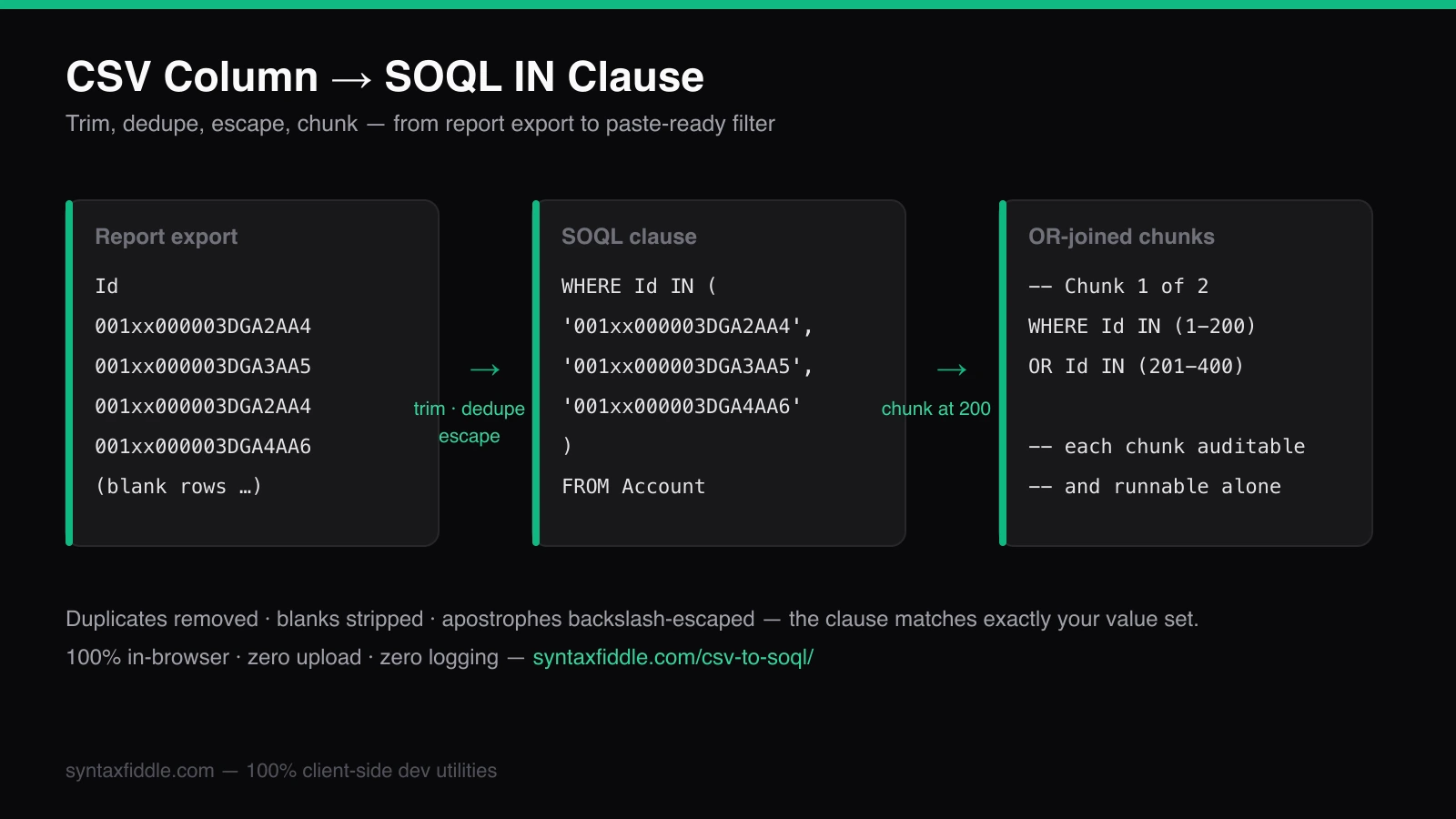
The fastest way to produce one from a spreadsheet is the CSV to SOQL converter: paste the file, pick the column, and the clause is generated with trimming, blank-stripping, deduplication, and quote-escaping already applied. For workbook-driven workflows, the Excel to SOQL converter handles the same job with report-export quirks — blank cells, scientific-notation Ids — accounted for, and the full CSV and Excel converter studio keeps every direction of the conversion in one place.
From report export to WHERE Id IN (...)
Report exports rarely arrive clean. The same Id appears on every opportunity
row; a trailing space rides along from a copied cell; one row holds the
header and another is blank. Raw-pasting that column into a query fails on
the first quote or blank. The cleanup is mechanical, which is exactly the
kind of work to hand to a tool: trim whitespace, drop empties, deduplicate
while preserving order, and single-quote-escape every value using
Salesforce's backslash rules — so an email value like
o'[email protected] survives as 'o\'[email protected]' inside the
clause rather than terminating the string.
Deduplication deserves emphasis because it is not cosmetic. Duplicate values inflate the clause's character count, add parser work, and can push an otherwise-fine filter past a tooling limit — and they match nothing the deduplicated list would not have matched. Report exports routinely contain the same Account Id dozens of times; the deduplicated clause is the honest one.
15-character vs 18-character Ids: pick one and match the field
Salesforce record Ids exist in two forms: the 15-character base —
case-sensitive, what the classic UI exports — and the 18-character form,
which appends a three-character suffix making the Id case-insensitive. Both
work inside IN clauses; SOQL compares them correctly against the records.
The problems begin when formats mix across systems: external tools, ETL
jobs, and custom joins treat the forms as distinct keys, and a mixed list
deduplicates poorly because the 15- and 18-character spellings of the same
record are different strings.
Two rules keep orgs out of trouble. First, within one generated clause, use
one form — if the spreadsheet mixes both, normalize to 18-character before
converting so dedupe collapses them correctly. Second, for anything
recurring — data loads, cross-system joins, middleware keys — standardize
on 18-character, and prefer external-ID fields over record Ids entirely:
they are stable across sandbox refreshes, indexed by default, and carry
business meaning. The generated-clause pattern is identical either way; only
the field name on the left of IN changes.
Chunking past 200 values without hitting parser limits
SOQL does not publish a hard per-clause value limit, but three practical ceilings arrive long before any documented one: the Developer Console and other query editors reject very long statements on raw length, query-plan quality degrades as lists grow, and a megabyte-scale paste simply will not fit in most tools' input boxes. The working convention — used by bulk tooling across the ecosystem — is chunks of about 200 values, OR-joined:
-- Chunk 1 of 3 (values 1-200)
SELECT Id, Name FROM Account
WHERE Id IN ('001...', '001...', /* …200 values… */)
-- Chunk 2 of 3 (values 201-400)
SELECT Id, Name FROM Account
WHERE Id IN ('001...', '001...')
Chunk comments are not decoration. A 3,000-value filter split into fifteen chunks is auditable — each chunk can be run separately, timed separately, and diffed when a rerun behaves differently. The CSV to SOQL converter applies the 200-value chunking automatically and comments each block, which is one of those small engineering choices that pays off the first time someone has to debug a partial load at 2 AM.
Selectivity: why the same IN clause can succeed or throw
Salesforce's query optimizer wants filters it can serve from an index. Id
is indexed; external-ID fields are indexed; a plain custom text field
usually is not. The same 2,000-value IN list is a fast indexed lookup on
Id and a non-selective filter — with the attendant exceptions and
timeouts — on an unindexed custom field. When a clause that worked against
one org's field throws NON-SELECTABLE or runs for minutes in another,
the field on the left side of IN is the first suspect.
The fixes, in order of preference: filter on Id or an indexed external ID
whenever the workflow allows; add a second indexed filter (a date range, a
record type) so the planner has an index to start from; or use the Query
Plan tool in the Developer Console to see the cost before running. What not
to do: shrink the list until it "works" — a 200-value non-selective filter
is still non-selective, just quietly slow instead of loudly failing.
Running the results in Apex with bind variables
Inside Apex, the spreadsheet list becomes a collection and the IN clause
takes a bind variable — safer than string concatenation and immune to
quoting bugs:
List<Id> accountIds = new List<Id>{
  '001xx000003DGA2AA4',
  '001xx000003DGA3AA5',
  '001xx000003DGA4AA6'
};

List<Account> accounts = [
  SELECT Id, Name, LastModifiedDate
  FROM Account
  WHERE Id IN :accountIds
];
Two governor realities shape the Apex version. The 50,000-row query limit
applies per transaction, so a filter returning more rows than that needs
batching with Database.getQueryLocator in a batch class rather than a
bigger IN list. And chunking still matters for selectivity and for
WHERE clauses built from dynamic values — chunked bind lists keep each
query's plan small and each failure scoped to one chunk, which is the same
reasoning as the plain-SOQL version, one level up the stack. When the
clauses get long enough to need reading rather than just running, the
SOQL Formatter reformats them into indented,
keyword-aligned shape before they go into the class.
The whole path, summarized
Spreadsheet column to Salesforce results is four steps: clean the values (trim, drop blanks, dedupe, escape), pick the right key (18-character Id or indexed external ID), chunk past 200 values with comments, and run — as a query, as Apex with bind variables, or in Workbench. Each step is mechanical, and the converter studio performs all four in one pass. The judgment calls — which key, which index, which chunk size — are yours; the arithmetic should not be.