The registration flow creates a contact, provisions a community user, and
then — in production, intermittently, with no code change — dies with
MIXED_DML_OPERATION_DENIED. The error is Salesforce's most literal guard
rail: a single transaction wrote to both halves of the platform's object
model, and the platform refuses to let one transaction's failure semantics
entangle metadata recalculation with business data. The fix is always the
same shape — put one of the two writes in its own transaction — but finding
which write to move, and proving it, is a debug-log job. This guide covers
the rule, the exact log signature, and the three transaction-splitting
patterns that resolve it.
Try it while you read
Salesforce Debug Log Analyzer — Parse debug logs — SOQL, DML, governor limits & errors.
What "mixed DML" actually means
Salesforce divides every object into two categories. Non-setup objects are the business data: Accounts, Contacts, Opportunities, custom objects — anything with rows of records. Setup objects are configuration-shaped: User, Group and GroupMember, PermissionSet and PermissionSetAssignment, UserRole, Territory assignments, and several more listed in the Apex developer documentation. Writing to a setup object triggers metadata-level recalculation — membership recomputation, permission recalculation — which the platform insists on isolating from business-data writes.
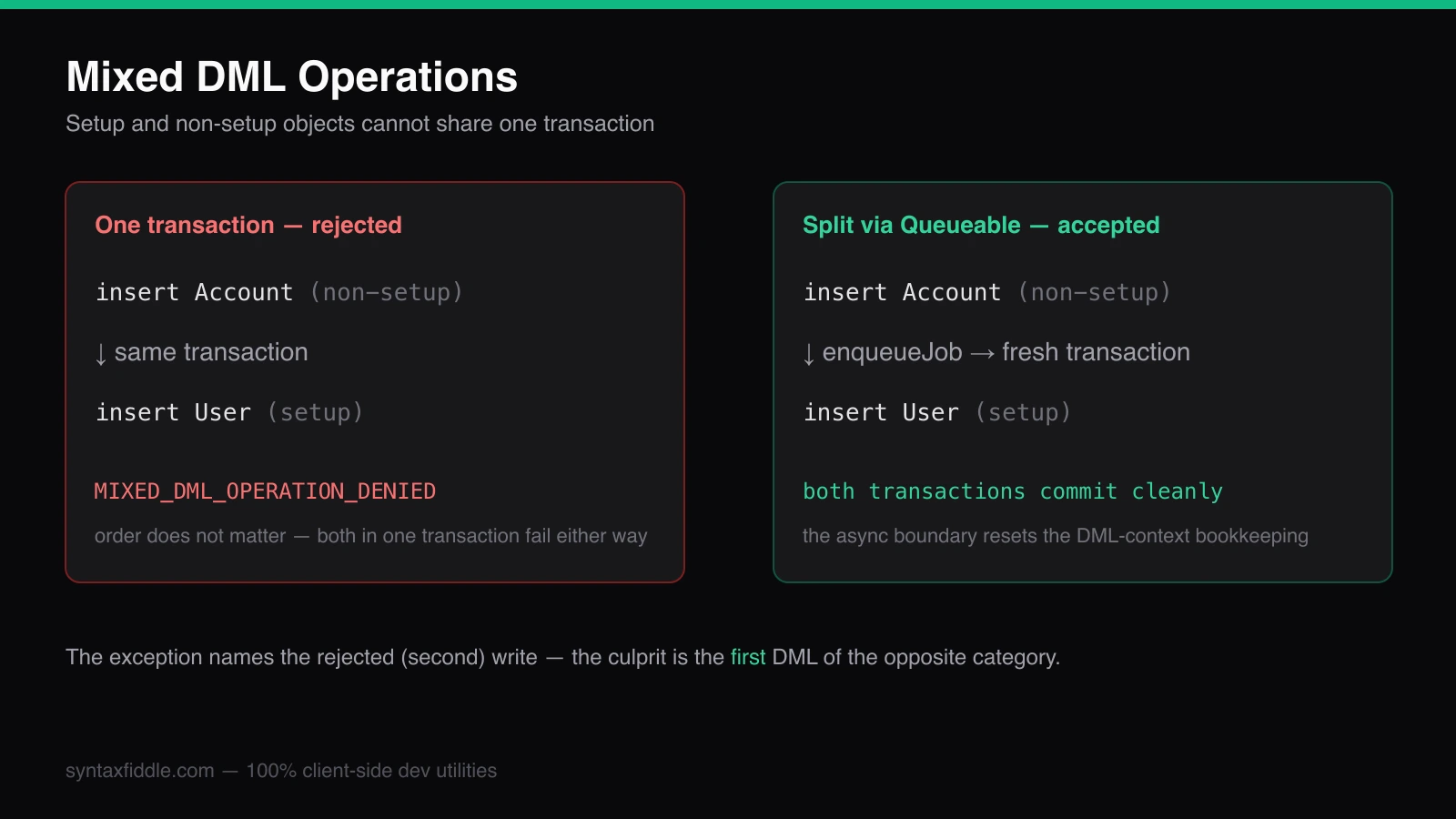
The rule that produces the error: one transaction may not perform DML on both categories. A trigger fires on an Account insert and then updates the account owner's User record — mixed. A site-registration handler inserts a Contact and then creates a portal User — mixed. Neither write is illegal alone; the combination inside one transaction is. Notably, order does not matter: swapping the two statements so the setup write comes first still fails, because the rule is about co-occurrence, not sequence.
The exact signature in a debug log
The failure surfaces as a System.DmlException with the
MIXED_DML_OPERATION_DENIED code, and the message names both sides of the
conflict:
16:42:07.118 (2384551931)|EXCEPTION_THROWN|[89]|System.DmlException:
Insert failed. First exception on row 0; first error:
MIXED_DML_OPERATION_DENIED, DML operation Insert not allowed on User
after attempting to update non-setup object Account
Read the message from the end backward. The rejected operation is the
setup-object DML — here, Insert ... on User. The non-setup object
named at the end — Account — is what was written earlier in the same
transaction. That asymmetry is the debugging key: the statement that threw
is the second DML, but the culprit is the first one. Moving or deferring the
earlier write is what fixes it, which is why people who delete the
innocent-looking final statement and rerun never understand why the error
just moved to the next setup write.
Finding the first DML in the log
The log gives you the full paper trail if you know the two markers to
grep. EXCEPTION_THROWN (or the uncaught System.DmlException at the end
of the transaction) pins the rejected write and its statement number —
[89] above. Then search upward for DML_BEGIN lines:
16:42:07.1 (2384100225)|DML_BEGIN|[64]|Op:Insert|Type:Account|Rows:1
16:42:07.1 (2384210844)|DML_END|[64]|
16:42:07.118 (2384551931)|DML_BEGIN|[89]|Op:Insert|Type:User|Rows:1
16:42:07.118 (2384551931)|EXCEPTION_THROWN|[89]|System.DmlException: ...
DML_BEGIN names the object type and the statement number of every write
in the transaction. The first DML_BEGIN whose type belongs to the opposite
category from the rejected one is your culprit — [64] above, the Account
insert. The statement numbers map back into the owning class, and
CODE_UNIT_STARTED names that class if the transaction spanned several.
On a large log, the
Salesforce debug log analyzer extracts
the exceptions with their Apex lines and lists every DML statement in
order, which turns the search into a glance.
The fix patterns: split the transaction
Since the rule is about one transaction, every fix is about getting one of the two writes into a transaction of its own. The three patterns, in order of preference:
Queueable (or @future) for the setup write. The standard shape:
public class ProvisionUserJob implements Queueable {
    private final Id contactId;
    public ProvisionUserJob(Id contactId) { this.contactId = contactId; }
    public void execute(QueueableContext ctx) {
        // Fresh transaction: setup-object DML is legal here
        User portalUser = buildPortalUser(contactId);
        insert portalUser;
    }
}

// In the main transaction — after the Contact insert:
System.enqueueJob(new ProvisionerJob(contact.Id));
The enqueue itself is not DML on a setup object, so it is legal mid-transaction,
and the job's execute runs in a fresh transaction where the User insert is
unmixed. @future works identically for simple cases; Queueable is preferred
for chaining and larger jobs. The cost is eventual consistency — the user
exists milliseconds later, not atomically — which almost every registration
and provisioning flow can tolerate.
Test classes: System.runAs is the same boundary. Tests hit this error
more often than production because creating test Users is routine. The
documented workaround is the same idea in test clothing:
User communityUser = buildTestUser();
insert communityUser;                       // setup DML
System.runAs(communityUser) {
    Account a = buildTestAccount();          // non-setup DML
    insert a;                                // legal: runAs resets the context
}
Design it out. The durable fix is refusing to mix the categories at the architecture level: registration handlers write business records and enqueue provisioning; sharing-rule automation never writes User records inline; config-data imports run in dedicated transactions. Teams that adopt this rule stop seeing the error rather than repeatedly dispatching it away.
When the error is the symptom, not the cause
One recurring variant deserves its own warning: the mixed DML is sometimes
introduced by a change elsewhere — a new flow, a managed package's
trigger, an extra before-save update that silently pulls a setup write into
a transaction that used to be clean. The log tells you which transaction
broke: compare the DML_BEGIN sequence in a failing log against a passing
one from before the change. The first DML_BEGIN that differs is the new
tenant in the transaction. This is why keeping a passing debug log attached
to every integration's runbook pays for itself — the diff is the diagnosis.
Frequently asked questions
What does MIXED_DML_OPERATION_DENIED mean in Salesforce?
A single transaction performed DML on both a non-setup object (Account,
Contact, custom objects) and a setup object (User, Group, PermissionSet).
Salesforce forbids the combination because setup writes trigger
metadata-level recalculation, and the transaction fails with
System.DmlException: MIXED_DML_OPERATION_DENIED.
How do I find a mixed DML error in a Salesforce debug log?
Search for MIXED_DML_OPERATION_DENIED or its surrounding
EXCEPTION_THROWN line, then grep upward for DML_BEGIN entries — the
first one naming an object of the opposite category is the write that
created the conflict. Its statement number maps back to the Apex line, and
CODE_UNIT_STARTED names the owning class.
How do I fix a mixed DML operation error in Apex?
Move the setup-object write into its own transaction: enqueue a Queueable
or @future job from the main transaction to do the User, Group, or
PermissionSet write. The async boundary starts a fresh transaction where
the setup DML is legal. Reordering the statements does not help — both
writes in one transaction fail regardless of order.
Why does my test class throw mixed DML but production does not?
Tests create Users (setup DML) next to test records (non-setup DML) as a
matter of course. The documented workaround is System.runAs(): create the
user, then perform the record DML inside a runAs block. The runAs boundary
resets the DML-context bookkeeping the same way an async boundary does in
production code.
Which Salesforce objects count as setup objects for mixed DML? User, Group, GroupMember, PermissionSet and PermissionSetAssignment, UserRole, territory objects, and others enumerated in the Apex developer docs. All business data — standard and custom objects alike — is non-setup. The error message names both sides of the conflict, so the message itself tells you which category each write belongs to.