The overnight sync fails, and the debug log contains no HTTP response to
read — no status code, no partner error body. Just an exception that says
Salesforce could not even authenticate to the remote system:
Unable to fetch the OAuth token. error: invalid_grant. This error lives in
a different layer than the 400s and timeouts: it happens at the token
endpoint, before your request is constructed, and it means the stored
authorization — the refresh token — is dead. This guide covers the exact log
signature, the six causes in practice, and the re-authentication path that
fixes each.
Try it while you read
Salesforce Debug Log Analyzer — Parse debug logs — SOQL, DML, governor limits & errors.
The signature: an exception with no request line
The defining feature of an invalid_grant failure is what is missing from
the log. A normal callout produces a CALLOUT_REQUEST / CALLOUT_RESPONSE
pair. An OAuth failure produces neither:
12:14:02.616 (2384011889)|EXCEPTION_THROWN|[52]|System.CalloutException:
Unable to fetch the OAuth token. error: invalid_grant.
error description: authentication failure.
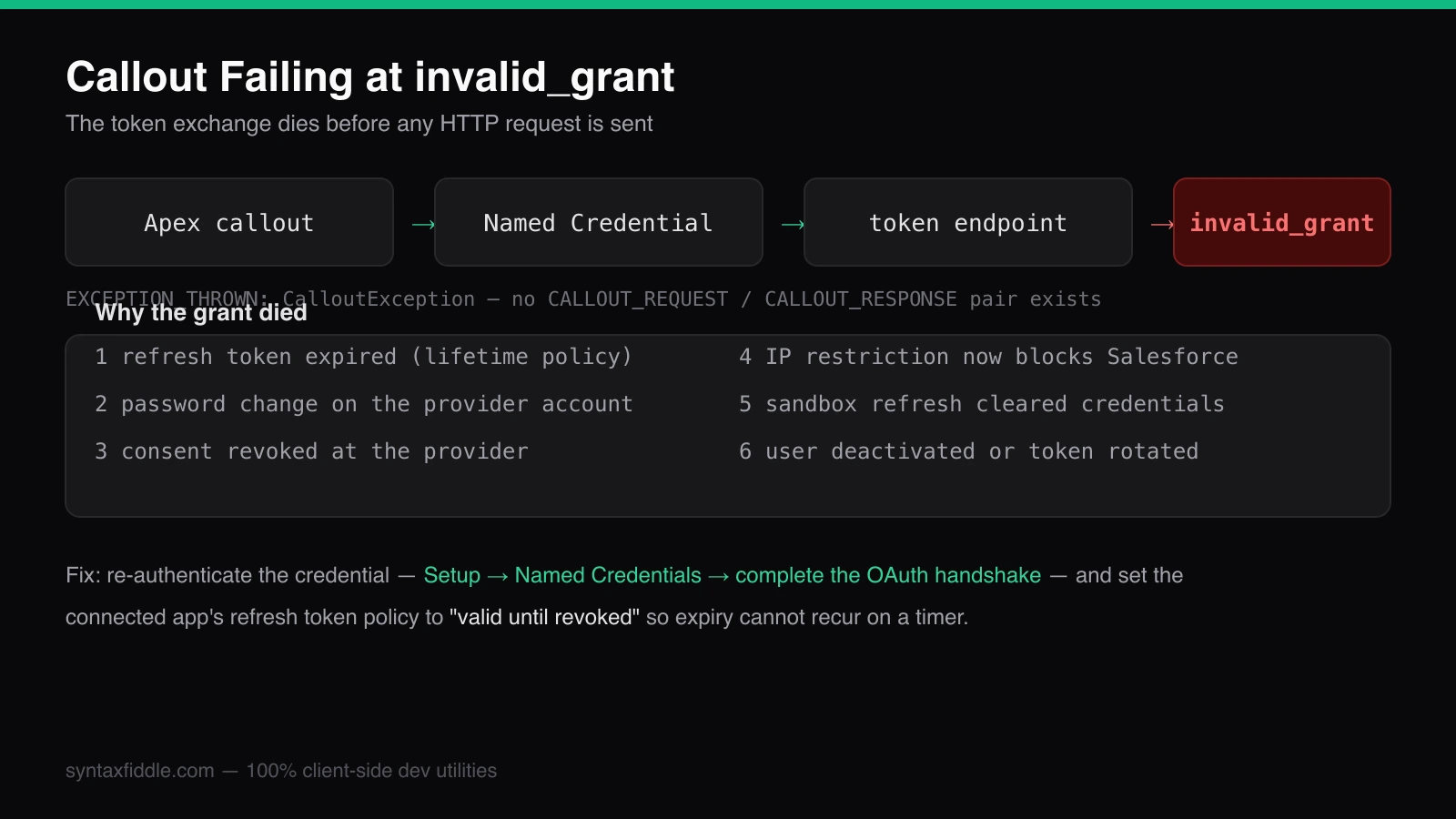
That absence is diagnostic in itself. Salesforce fetches the access token
from the identity provider before sending your request — for a Named
Credential (callout:Partner_API), the token exchange is automatic and
invisible when it works. When the exchange fails, there is no access token,
so no request is sent, so the log jumps straight from your code's statement
number to the exception. If your log shows EXCEPTION_THROWN with
CalloutException and no callout pair, the problem is authentication state,
not payload, network, or the partner's API.
What invalid_grant actually means
invalid_grant is a standard OAuth 2.0 error code (RFC 6749, section 5.2):
the grant presented to the token endpoint — Salesforce's stored refresh
token — is invalid, expired, revoked, or was issued to another client. In
practice, six causes cover nearly every occurrence:
- The refresh token expired. The connected app's refresh token policy has a lifetime ("expires after N days of no use", or a fixed window). Quiet integrations die exactly at the expiry boundary — the job that ran fine for 89 days fails on day 90.
- The user changed their password. Many providers invalidate existing refresh tokens on password change as a security measure. One password reset kills every integration authenticating as that user.
- Consent was revoked. Someone clicked "revoke access" in the provider's authorized-applications page — or a policy sweep did.
- IP restrictions now block Salesforce. The connected app or the provider added IP ranges, and Salesforce's token requests fall outside them. The grant is fine; the handshake is refused.
- A sandbox refresh. Refreshing a sandbox can clear stored credentials, leaving the sandbox's Named Credential pointing at authorization that no longer exists.
- The user was deactivated or the token was rotated by an org policy, an offboarding script, or a provider-side security event.
Diagnosing which cause — from the log and the calendar
The log confirms the layer; the calendar usually confirms the cause. Correlate the exception's timestamp against three things: recent password changes or deactivations for the authenticating user (causes 2 and 6), sandbox refresh dates (cause 5), and the integration's own run history — a failure that appears after a long quiet period smells like expiry (cause 1), while one that starts mid-day with no quiet period points at revocation or IP changes (causes 3–4).
Scope also discriminates: if every callout through one Named Credential fails, the credential's grant is dead (one fix). If callouts through several credentials all fail at once, suspect an org-level change — IP rules, a security policy, a My Domain or connected-app update. If only one user's per-user credential fails while others succeed, it is that user's password or token state. The debug log analyzer groups exceptions by code unit, which makes the "one credential or many?" question answerable in seconds on a busy log.
The fix: re-authenticate the credential
The fix is always to store a fresh grant — the error is not in your code:
- Named Credentials (named principal): Setup → Named Credentials → open the failing credential → complete the OAuth handshake again ("Save" with authentication re-run, or use the provider-specific re-auth flow). One admin action fixes every callout that uses the credential.
- External Credentials / OAuth 2.0 flows (per-user authorization): each user must re-authenticate individually — Salesforce surfaces a re-auth link, or you trigger the authentication flow from the External Credential's user page.
- Check the connected app's refresh token policy while you are there: "Refresh token is valid until revoked" is the setting that stops cause 1 from recurring. Any fixed-lifetime policy guarantees this incident returns on schedule.
- Verify IP relaxation on the connected app covers Salesforce's egress (cause 4), and that the authenticating user is active with a current password (causes 2 and 6).
For sandbox-originated failures, re-authentication inside the refreshed sandbox is the fix — credentials do not survive the refresh.
Making the integration survivable
invalid_grant is not preventable in the general case — providers revoke
tokens for reasons outside your control — but it is detectable and
fast-recoverable. Three practices: alert on the signature rather than the
endpoint (a spike of CalloutException with invalid_grant in any log is
one notification, not thirty failed-sync tickets), prefer named-principal
credentials for system-to-system integrations so one re-auth restores the
integration instead of forty users' worth, and log the token endpoint's
response in custom auth flows so the provider's exact message ("account
closed", "password expired") is captured rather than the generic wrapper.
The pattern is the same one the
callout error guide applies to
HTTP failures: the diagnosis arrives in the log only if someone logged it.
Frequently asked questions
What does invalid_grant mean in a Salesforce debug log?
The OAuth token exchange failed because the stored refresh token is no
longer valid — expired, revoked, or unusable. Salesforce cannot obtain an
access token, so the callout never leaves the org and the log shows
System.CalloutException: Unable to fetch the OAuth token. error: invalid_grant with no HTTP status to read.
Why does my Named Credential suddenly throw invalid_grant? Something invalidated the stored grant: a password change on the provider account, a revoked consent, an expired refresh-token policy, IP restrictions newly blocking Salesforce's token requests, or a sandbox refresh that cleared the credential. The integration code is unchanged — the authentication state behind it died.
How do I fix the OAuth invalid_grant error in Salesforce? Re-run the authentication flow for the failing credential: Setup → Named Credentials → complete the OAuth handshake to store a fresh refresh token. For per-user (External Credential) authorizations, each affected user must re-authenticate. While there, set the connected app's refresh token policy to "valid until revoked" so expiry cannot recur on a timer.
Why is there no CALLOUT_REQUEST line in the debug log?
The token fetch precedes the callout: Salesforce obtains the access token
first, and that exchange returned invalid_grant. With no token there is no
outbound request, so the log contains EXCEPTION_THROWN with the
CalloutException but no CALLOUT_REQUEST/CALLOUT_RESPONSE pair — the
absence that distinguishes authentication failures from payload failures.
How do I stop invalid_grant errors from recurring?
Use refresh-token policies without fixed lifetimes, named-principal
credentials for system integrations (one re-auth restores everything), IP
relaxation that covers Salesforce's egress, and monitoring that alerts on
the exception signature — CalloutException with invalid_grant — so a
dying grant is caught by operations instead of by the first failed sync.