A report export lands with a column of 15-character IDs, someone VLOOKUPs it against a second sheet, and two different accounts silently match the same row. Or an integration team stores IDs from a report in a case-insensitive database, and joins start colliding for one customer in ten thousand. Both incidents trace to the same root: Salesforce IDs are case-sensitive, and most of the software that touches them is not. The fix is the 18-character case-safe form — and computing it is a small, fully deterministic algorithm you can run in Excel, in Apex, or in a browser tool.
Try it while you read
Salesforce ID Converter — Convert 15-digit Salesforce IDs to case-safe 18-digit IDs — instantly, offline.
Why Salesforce IDs come in two lengths
The 15-character ID is a base62 string: each position can be a digit, an
uppercase letter, or a lowercase letter, which packs enough uniqueness into
15 characters to identify every record in an org. The catch is that this
uniqueness depends on case — 0033000001QyXb5 and 0033000001qyxb5 are two
different records, and only a case-sensitive comparison can tell them apart.
Excel's VLOOKUP, most SQL collations, and a long list of integration
platforms compare case-insensitively, so to those systems the two IDs are
the same string.
The 18-character form fixes exactly that, without changing the ID. Salesforce keeps the original 15 characters and appends three check characters computed from the case pattern of the original. Lowercase everything and the first 15 characters now collide — but the appended suffix differs, so the full 18-character string still distinguishes the records. APIs, SOQL, Data Loader, and record URLs accept both forms interchangeably; the 18-character form is what case-insensitive systems should store.
The check-character algorithm, chunk by chunk
The three suffix characters are not random — they are a pure function of the first 15 characters, which is why anyone can recompute them. The algorithm:
- Split the 15-character ID into three chunks of five characters.
- For each chunk, walk the five characters left to right and build a 5-bit number: position 1 is worth 1, position 2 is worth 2, then 4, 8, and 16. A bit is set only when that character is an uppercase letter — digits and lowercase letters set nothing.
- Map each chunk's 0–31 value onto the alphabet
A-Zfollowed by0-5: 0 → A, 1 → B, … 26 → 0, … 31 → 5.
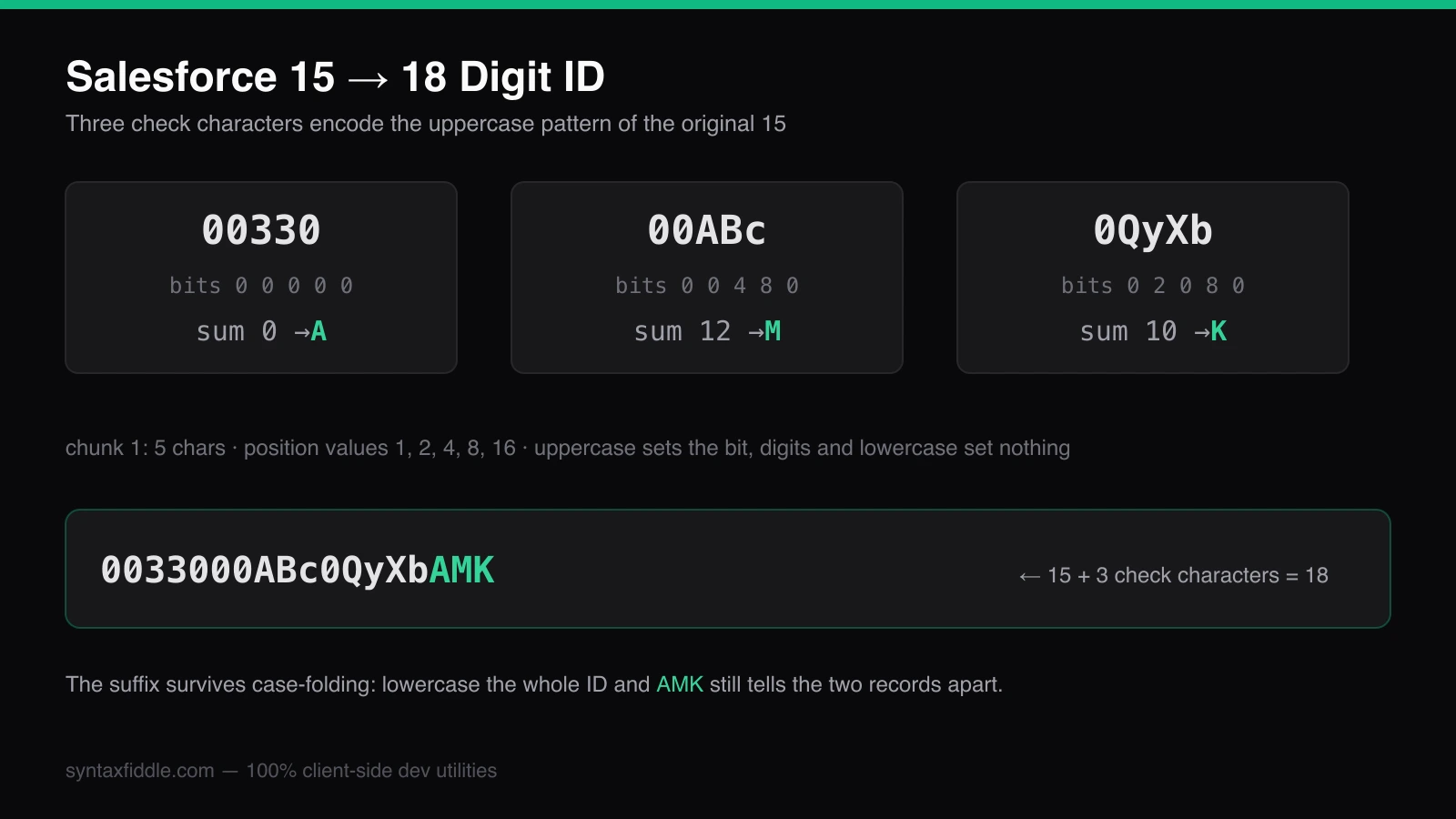
Worked example, on the ID 0033000ABc0QyXb5:
Chunk 1: 00330 → no uppercase letters          →  0 → A
Chunk 2: 00ABc → A (pos 3, +4) + B (pos 4, +8) → 12 → M
Chunk 3: 0QyXb → Q (pos 2, +2) + X (pos 4, +8) → 10 → K

18-character ID: 0033000ABc0QyXb5 + AMK = 0033000ABc0QyXb5AMK
The suffix depends only on which positions are uppercase, not on which
letters they are — 00ABc and 00DEF produce the same check character,
because both have uppercase letters at positions 3 and 4. That is the whole
point: the suffix survives case-folding, so the ID stays distinguishable even
after a case-insensitive system has flattened it.
The Excel formula that gets it right
Most Excel formulas circulating for this conversion are subtly wrong. They
compare each character with UPPER() of itself — a test that returns TRUE
for digits too, because UPPER("5") is still "5". A digit at position 3
then sets the same bit an uppercase letter would, and the suffix comes out
wrong. The reliable version tests the character code explicitly, which
CODE() makes easy: uppercase A-Z is 65–90 in every Excel locale.
Compute one check character per cell — the ID sits in A1, and this formula
reads its first five characters:
=MID("ABCDEFGHIJKLMNOPQRSTUVWXYZ012345",
  1
  + IF(AND(CODE(MID($A$1,1,1))>=65,CODE(MID($A$1,1,1))<=90),1,0)
  + IF(AND(CODE(MID($A$1,2,1))>=65,CODE(MID($A$1,2,1))<=90),2,0)
  + IF(AND(CODE(MID($A$1,3,1))>=65,CODE(MID($A$1,3,1))<=90),4,0)
  + IF(AND(CODE(MID($A$1,4,1))>=65,CODE(MID($A$1,4,1))<=90),8,0)
  + IF(AND(CODE(MID($A$1,5,1))>=65,CODE(MID($A$1,5,1))<=90),16,0),
  1)
Duplicate the formula in two more cells with positions 6-10 and 11-15, then assemble the 18-character form with plain concatenation:
=A1 & B1 & C1 & D1
The formula uses only classic functions, so it works unchanged in Excel 2016, LibreOffice, and Google Sheets. For one-off conversions it is the fastest route; for a column of thousands, paste the whole column into the Salesforce ID converter instead and copy the results back as text — which also sidesteps Excel's habit of reformatting long IDs as scientific notation.
Converting in Apex: one call per row
Inside Salesforce, the conversion is usually a non-event: Apex and SOQL
compare IDs case-sensitively, and assigning a 15-character string to an Id
variable normalizes it to the 18-character form automatically:
Id recordId = '0033000ABc0QyXb5';
System.debug(recordId);        // 0033000ABc0QyXb5AMK
System.debug(String.valueOf(recordId)); // 18 characters, always
That normalization is why Set<Id> deduplicates mixed-format input
correctly, and why code inside the org rarely needs a manual conversion. The
place you do need one is the boundary — building a CSV export in a Batchable,
responding to a REST call, or handing IDs to a middleware that stores them
case-insensitively. For those, a utility method mirrors the algorithm:
public static String to18CharId(String id15) {
    if (id15.length() != 15 && id15.length() != 18) {
        throw new StringException('Expected a 15- or 18-character Salesforce Id');
    }
    if (id15.length() == 18) {
        return id15;
    }
    String alphabet = 'ABCDEFGHIJKLMNOPQRSTUVWXYZ012345';
    String suffix = '';
    for (Integer chunk = 0; chunk < 3; chunk++) {
        Integer bits = 0;
        for (Integer i = 0; i < 5; i++) {
            String c = id15.substring(chunk * 5 + i, chunk * 5 + i + 1);
            if (c >= 'A' && c <= 'Z') {
                bits += 1 << i;
            }
        }
        suffix += alphabet.substring(bits, bits + 1);
    }
    return id15 + suffix;
}
Passing an 18-character ID through the method is a no-op, so it is safe to call unconditionally on any ID-shaped string leaving the org. The fastest unit test is a round-trip: convert any 15-character ID, truncate the result back to 15, and assert equality.
The VLOOKUP trap: why 15-character IDs collide in spreadsheets
The failure that sends teams looking for this conversion is always the same
shape. A report exports 15-character IDs into sheet one; a second sheet holds
the same records with IDs that came from a different export — record URLs,
an API response, a Data Loader file. A VLOOKUP between them matches by
case-folded text, and two records whose IDs differ only in letter case
resolve to the first match. The symptom is subtle: wrong values on a tiny
fraction of rows, usually none of them obviously broken, because the
collision only fires when case differs and both records appear in both
sheets.
Three habits prevent it. Store the 18-character form in any sheet another
sheet might join against. Format ID columns as Text before pasting, so
Excel never reformats them as scientific notation (1.53E+15 destroys the
ID outright). And when a mixed-format list does arrive, normalize it before
deduplicating — the same record spelled 15 and 18 characters is two different
strings to every text function Excel has.
18 back to 15: the lossless direction
Going the other way needs no algorithm at all: the suffix is pure check data, so dropping the last three characters always recovers the original ID. That asymmetry is worth internalizing because it makes the conversion verifiable — a tool or formula that claims to convert can be checked by truncating its output and comparing. It also gives the suffix a second job: an 18-character ID whose suffix does not match the case pattern of its first 15 characters has been hand-edited or truncated somewhere in transit. The ID converter re-computes the suffix on every 18-character input and flags mismatches, which is a quick forensic pass on any spreadsheet of suspect provenance.
Convert, then paste — the working loop
The whole workflow is three steps: get the IDs into one format (18-character
for anything leaving the org), keep them as text, and only then join, load,
or sync. For bulk columns, the
ID converter handles the conversion with prefix
detection and checksum verification; for the queries those IDs feed, the
SOQL IN clause guide covers turning a
spreadsheet column into a working WHERE Id IN (...) filter, and the
CSV to SOQL converter generates the clause directly from
the cleaned file. Conversion, query, done — no case-collisions in between.
Frequently asked questions
How do I convert a 15-character Salesforce ID to 18 characters? Split it into three five-character chunks, set a bit for each uppercase letter (worth 1, 2, 4, 8, 16 by position), and map each chunk's total onto the alphabet A-Z0-5. The three mapped letters are the suffix. The ID converter does it instantly, in bulk, with checksum verification on 18-character inputs.
What is the Excel formula for the 15 to 18 digit conversion?
A CODE()-based test of each character's ASCII range (65–90), one cell per
check character, then =A1 & B1 & C1 & D1. Avoid the popular
UPPER()-comparison formulas — they also count digits as uppercase, which
sets bits that should stay zero and silently produces a wrong suffix.
Why is my 15-digit Salesforce ID wrong in Excel VLOOKUP? VLOOKUP compares text case-insensitively, so records whose IDs differ only in letter case match the same row. Convert both sides to the 18-character case-safe form before joining — the suffix keeps distinct records distinct even after case is lost — and store ID columns as Text so Excel does not reformat them.
Does converting 15 to 18 characters work both directions? The 18-to-15 direction is plain truncation — the suffix is derived data. The 15-to-18 direction recomputes the suffix from the case pattern, which is deterministic: the same 15-character ID always yields the same suffix, so conversions are repeatable and 18-character inputs can be verified.
Why does Salesforce have 15 and 18 character IDs? The 15-character form is a compact case-sensitive base62 key; the 18-character form appends a three-character checksum so case-insensitive systems can still tell records apart. Both identify the same record and are accepted interchangeably by APIs, SOQL, and Data Loader — external systems should store the 18-character form.